
ClawDOS is an open-source AI coding agent that runs on FreeDOS inside a real IBM PC XT (8088 at 4.77 MHz, 640K RAM, CGA)—and it is not a joke build. Ricapar’s project page and GitHub repository describe HARNESS.EXE, a 176 KB DOS program that implements the full agent loop: streamed Claude Messages API requests, eighteen tools, on-disk chat history, skills, and a default safe mode that prompts before file, memory, or port changes. The XT talks to the model over Wi-Fi through mTCP, but TLS terminates on a separate bridge machine so the API key can stay off the DOS disk.
If you run Claude Code, Codex, or a self-hosted harness, you will never deploy on DOS—but ClawDOS is a sharp stress test for questions you should already be asking: where secrets live, what happens when safe mode is off, which tools are inherently privileged, and what your flight recorder actually logs.
TL;DR
| Question | Answer |
|---|---|
| Am I affected? | Indirectly if you build or trust custom agent harnesses—ClawDOS is a reference design, not malware. |
| Is there a CVE or patch? | No—this is new open-source agent tooling, not a disclosed vulnerability. |
| Does data leave my machine? | Yes when live: prompts, tool output, and PNG screenshots go to the Messages API host you configure. |
| Should I run it? | Only on isolated lab hardware or emulators with a throwaway API key and a locked-down tunnel host. |
| Coding-agent takeaway? | Copy the TLS/key split and default confirmations; treat peek/poke/port like root-equivalent tools on any OS. |
What ClawDOS actually is
Ricapar positions ClawDOS as “an AI coding agent for DOS.” The machine target is an IBM PC XT 5160: 8088 at 4.77 MHz, 640K conventional memory, CGA graphics. On modern hardware Ricapar uses a PicoMEM card so the “hard disk” is a microSD image (easier resets than a 20 MB MFM drive), with Wi-Fi presented as an NE2000 for TCP/IP under FreeDOS 1.4 and mTCP.
The user-facing entry is CLAWDOS.EXE (29 KB launcher); the agent is HARNESS.EXE (~13,000 lines of C/C++ built with Open Watcom for 8086). You type CLAWDOS at C:\> and chat on an 80-column CGA UI. The model can read and edit files, search the tree, run compiled programs (Turbo C, assemblers, GW-BASIC per the bundled dev kit), and encode CGA screenshots as PNG on the 8088 for vision-style tool results.
The author notes that almost the entire repo was written by Claude; the human-authored text is limited to the backstory box. That meta-detail matters for supply-chain readers: this is both a demo of agent-built software and a production-shaped harness with tests (31 boot tests in DOSBox-X against a mock API, plus DOS-side unit tests).
Architecture: agent on DOS, TLS on something else
The security-shaped design choice is the split trust boundary:
IBM PC XT (8088)                    Bridge PC (modern OS)
┌─────────────────────┐            ┌──────────────────────┐
│ HARNESS.EXE         │ plain HTTP │ tunnel/tunnel.py     │
│ 18 tools, disk logs │ ─────────► │ holds API key (opt.) │
│ mTCP                │            │ HTTPS to Messages API│
└─────────────────────┘            └──────────────────────┘
The project documentation states the 8088 does everything but TLS. Alternatives listed include socat or stunnel—same pattern: the slow machine never negotiates modern cipher suites, but whoever controls the tunnel sees plaintext HTTP unless you add another layer.
For coding-agent teams, that mirrors real setups:
- A thin local CLI (your laptop) and corporate TLS gateway terminating trust for SaaS APIs.
- A CI runner that cannot hold secrets, paired with a sidecar that injects tokens—except here the sidecar is literally Python on another box.
Practical check: if you copy this pattern, harden the tunnel host (bind to localhost or a VLAN, firewall egress, rotate keys, log connects). The DOS box is not the only asset—the bridge is the crown jewel.
The tool surface: why eighteen tools matter
ClawDOS exposes a Messages API tool schema comparable to a minimal IDE agent:
| Category | Tools | Risk notes |
|---|---|---|
| Discovery | sysinfo, dir, read, search | Exfiltration and recon—expected for a coding agent. |
| Mutation | write, edit, delete, mkdir, rename | Destructive filesystem ops; safe mode gates these when on. |
| Execution | run | Up to twelve commands per call, optional screenshot mid-run—closer to CI than “read-only chat.” |
| Hardware | peek, poke, port | Direct memory and I/O—equivalent to handing the model a debugger driver on modern systems. |
| Persistence | memory_* under C:\MEMORY | Skills and memories are plain text injected into the system prompt context—same class of risk as agent skills on disk. |
| Output | play, textart | Low risk, but still user-visible side effects. |
The project ships skills (guides for compilers, CGA effects) and memories (what you built together) as files listed in every conversation’s system prompt and read on demand—the same “untrusted content becomes prompt” problem covered in our MCP security guide.
Safe mode and what F3 disables
Safe mode is on by default. File, memory, and port mutations prompt Allow ...? (y/n) before proceeding. F3 turns safe mode off.
That is the same product decision as yolo mode debates in mainstream agents: convenience trades away the last human milliseconds before irreversible change. On DOS with peek/poke/port, turning safe mode off is closer to sudo NOPASSWD than skipping a confirmation dialog in an editor.
An agent at work on the screen
The maintainer’s screenshots show multi-step tool loops—search, read, edit—in the CGA transcript. This is the live proof that the harness streams tool calls and results like any modern agent UI, only at 4.77 MHz.
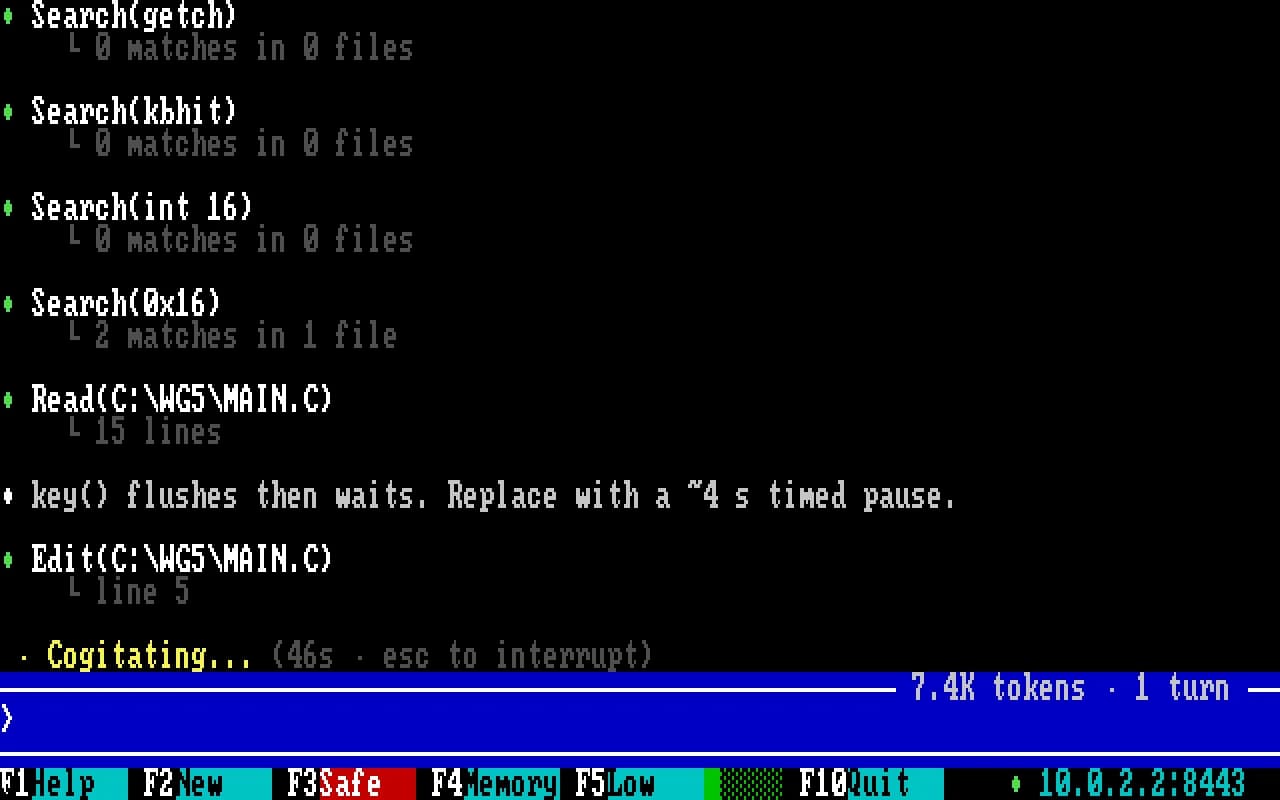 Image: Ricapar (ClawDOS)
Performance is part of the threat model: the project page’s PRIMES.C example took 64 seconds from one user message through compile and run (26 seconds in the build phase); the harness steps out of memory so Turbo C sees ~450K free during builds. The separate WarGames tribute is a larger multi-file graphics demo, not that timing benchmark. Slow turns give humans more time to hit Esc (stop reply) but also more time to walk away while run executes a long batch.
Logging, caching, and what leaves the machine
ClawDOS keeps a flight recorder in CLAWDOS.LOG: time to first token, upload size, token counts, cache reads. Example line from the docs:
api anthropic claude-opus-5-5 round=1 ttft=2750 total=4015 up=165 len=1784 stop=tool_use in=2 out=221 cr=5543 cw=739 th=cont
That is the kind of audit trail compliance teams ask for in agent monitoring products—here it is a flat file on the DOS volume.
The API side uses prompt caching so after the first request the PC “uploads only what is new,” with tool results on the order of ~500 bytes in the docs’ example. Screenshots and file contents are still exfiltration-class data whenever they are attached to a tool result.
Offline path: tunnel/mockapi.py implements a fake Messages API for emulator runs without a live key—useful for regression tests, and a reminder that mock endpoints still execute real tools against your disk image.
What developers are saying
The Hacker News thread is small but on-point. sans_souse reacted positively to the visible agent loop on retro hardware. Tiberium framed the project as part of a broader pattern—starting agents in “unusual environments (DOS, Linux running on a feature phone, Windows 95, etc)” to see how they behave—which is essentially adversarial ergonomics testing without a formal red-team budget.
What this means if you run AI coding agents
You are probably not flashing CLAWDOS.IMG onto a PicoMEM card today. You should still steal the checklist:
- Inventory privileged tools—anything like
run,delete, or hardware memory tools belongs in enforce policy, not “we trust the model.” - Default allow-to-execute should be off for destructive classes; ClawDOS’s safe mode is the right default; document who can disable it and when.
- Separate TLS and secrets from the environment where untrusted code and skills load—same idea as keeping API keys out of VM images you hand to agents (managed agent patterns push this further with server-side isolation).
- Persisted memories and skills are input—scan and version-pin them before they enter the system prompt, the same way you would an MCP config.
- Read the flight recorder after incidents—
CLAWDOS.LOGis crude but complete enough to reconstruct token and tool rounds; your Claude Code or Codex logs should answer the same questions.
On a developer laptop, update mainstream agents on their normal cadence; ClawDOS has no CVE track. If you experiment with the repo:
python3 scripts/setup-tools.py
python3 scripts/build.py
python3 tunnel/tunnel.py
python3 scripts/run86box.py
Use a dedicated API key, no production repos mounted into the image, and assume the tunnel host can read every prompt.
What Beam can and cannot do here
Beam is built for modern coding agents on your workstation, not DOS. Where it still applies:
- PreToolUse hooks on Claude Code and Codex can log or deny proposed shell and file tools when workspace policy is cached in enforce mode—see agent hooks in the docs.
- Skill and MCP scanning runs on-device with eleven heuristic patterns plus an MCP version-pin check before you trust third-party definitions—relevant to ClawDOS-style skills on disk, even though Beam does not scan
C:\MEMORY. - Redaction before storage helps when logs would otherwise capture secrets from tool output.
Limits to state plainly: Beam is not a kernel sandbox, does not wrap Ricapar’s tunnel, does not block outbound Anthropic traffic, and is fail-open without cached policy. It will not stop a turned-off safe mode inside ClawDOS—that harness does not integrate Beam hooks at all.
For visibility into what agents did—as opposed to what they asked to do—start from /#watches and pair it with your vendor’s own transcripts.
Related reading
- MCP security practical guide — tool servers, DNS rebinding, and skills treated as untrusted input.
- What is AI agent monitoring? — what a flight recorder should capture.
- Parcha AgentRun — server-managed agents and isolation patterns contrasted with DIY harnesses.
- Jupyter MCP Server CVE-2026-77359 — when local HTTP adjacency to agents goes wrong on modern OSes.
- Cloudflare security audit skill — skills shipped as files in the prompt path.
Primary sources: ClawDOS project page, GitHub — Ricapar/ClawDOS, HN discussion.
Technical details, tool list, and performance numbers reflect Ricapar’s published documentation and repository as of November 21, 2026. ClawDOS is third-party GPLv3 software; Beam does not maintain it.
Frequently asked questions
What is ClawDOS?
ClawDOS is an open-source AI chat and coding harness for DOS by Ricapar. It runs as HARNESS.EXE on an IBM PC XT class machine, talks to any host that implements the Claude Messages API, and exposes 18 tools for files, search, running DOS programs, memory and I/O ports, screenshots, and persistent notes on disk.
Does ClawDOS store my Anthropic API key on the DOS disk?
Not necessarily. The project’s docs say the TLS tunnel on another machine can hold the API key so the key never touches the PC’s disk. The DOS side sends plain HTTP to the tunnel; the tunnel terminates HTTPS to api.anthropic.com. You still need to protect the tunnel host like any secret store.
What is safe mode in ClawDOS?
Safe mode is on by default. According to the project page, anything that changes a file, memory, or a port asks Allow ...? (y/n) first. Press F3 to turn safe mode off, which removes that gate for destructive tool calls.
Can ClawDOS run without an internet API?
Yes, for offline testing. The docs describe python3 tunnel/mockapi.py as a mock Messages API, and launching with CLAWDOS 10.0.2.2:18023 against that mock endpoint in the emulator.
What tools does ClawDOS give the model?
Eighteen tools: sysinfo, dir, read, search, write, edit, delete, mkdir, rename, run (up to twelve commands with optional screenshot), peek, poke, port, play, textart, and memory_list, memory_read, memory_write for notes in C:\MEMORY.
Is ClawDOS only a demo or can I run it?
It is runnable open source under GPL-3.0. You need a Mac or Windows host with Python 3, an Anthropic API key for live calls, scripts/setup-tools.py for compilers and emulators, tunnel/tunnel.py for TLS, and either python3 scripts/run86box.py for emulation or a PicoMEM SD image for real hardware.
How is ClawDOS related to Claude Code or Codex?
It is not a replacement IDE. It is a research harness showing how far a Messages API agent loop can go on extreme CPU and RAM limits. Lessons—TLS split, default confirmations, tool logs, skills on disk—map to how you evaluate any custom agent runtime, not to migrating your day job off DOS.
Does Beam block ClawDOS-style peek and poke tools?
Beam does not ship inside ClawDOS. On Claude Code and Codex, Beam can log PreToolUse proposals and deny matching actions when workspace policy is cached and enforce mode is on. It does not stop outbound API traffic or sandbox DOS memory writes; hook coverage is heuristic and fail-open without cached policy.