

Forever Security, an AI-security startup, reports that the browsers built into five popular AI assistants share one design flaw, and that the issues in OpenAI's Codex and Microsoft's VS Code are still unpatched. In its technical write-up, the firm says Cursor, GitHub Copilot, Claude Desktop, Codex and VS Code each embed a browser and relax a normal browser safety rule to serve the agent. The Register's coverage gave the research its wider audience on October 29.
The class is called Embrace, for embedded browser. If you use any of these tools, the practical point is simple: the embedded browser is part of the agent's attack surface, and a page it opens can be an instruction source or a way to read your files. Below: what each bug does, the disclosure timeline, and what to check.
Quick answers
| Question | Answer |
|---|---|
| Am I affected? | If you use Cursor, Copilot, Claude Desktop, Codex or VS Code and open untrusted pages or projects in their built-in browser or preview. |
| Is there a fix? | Cursor: patched Oct 1 (silently). Copilot: fixed in build 1.1.29. Claude Desktop: not stated. Codex and VS Code: reported unpatched. |
| Is there a CVE? | None mentioned in the sources. |
| Is it exploited in the wild? | Not reported. These are researcher proofs of concept. |
| Does data leave my machine? | In the file-read bugs, a hostile local page can read files and could send them out; the write-up describes reads, and keeps payloads private. |
| What do I do? | Update, avoid untrusted content in embedded browsers, turn off agent auto-run, keep secrets out of reach. See below. |
What "embedded browser" means here
AI desktop apps increasingly ship a browser pane so the agent can open a page, preview a local app or inspect a site. To make that useful, vendors give the pane abilities an ordinary browser tab does not have: a bridge that sends page content to the agent, an address bar the app controls, or access to local file:// pages. Forever Security's argument is that each of those exceptions removes a boundary the web normally enforces.
The write-up names three variants: arbitrary code execution (Cursor), arbitrary content exfiltration (Claude Desktop, Codex, VS Code) and arbitrary context emulation (Copilot). We have not reproduced the payloads, and Forever Security says it left working exploit code out of its public write-up.
The five findings
| Tool | Class | Status per Forever Security and The Register |
|---|---|---|
| Cursor | Code execution via prompt injection | Disclosed Sept 10, patched Oct 1 without an advisory |
| GitHub Copilot | Address bar spoofing | Found in 1.1.27 on Sept 26, fixed in 1.1.29 on Oct 13 |
| Claude Desktop | File read via web worker | Disclosed July 23, first rejected; accepted after a second report; patch not stated |
| OpenAI Codex | File read, no worker needed | Disclosed July 27, no response, reported unpatched |
| Microsoft VS Code | File read via web worker | Disclosed Sept 10, rejected as invalid, reported unpatched |
Cursor: a page talks to the composer
According to the write-up, the page-exposed bridge sends content into Cursor's agent composer, where the agent reads it as an instruction rather than as untrusted page text. The payload hides a command across several fields that the agent reassembles. With auto-run enabled and an empty allowlist, one keystroke runs the command. The researchers report a working proof of concept starting from a cold session, and note that success depends on the model. Their screenshot shows the macOS Calculator launching over a hostile page. This is ordinary prompt injection with an unusual delivery channel: the browser pane itself.
Copilot: the address bar believes the page
The Copilot app accepted a page-reported URL and checked only that it looked like a URL (an http, https or file scheme), not where the page had really loaded. A page can therefore change its own reported address without a real navigation. The image below, published by Forever Security, shows a forged github.com/login bar above a sign-in page that is served from an attacker's host. Per the write-up, both the user and the agent saw the false address, which matters because agents use the address to decide whether a page is trustworthy.
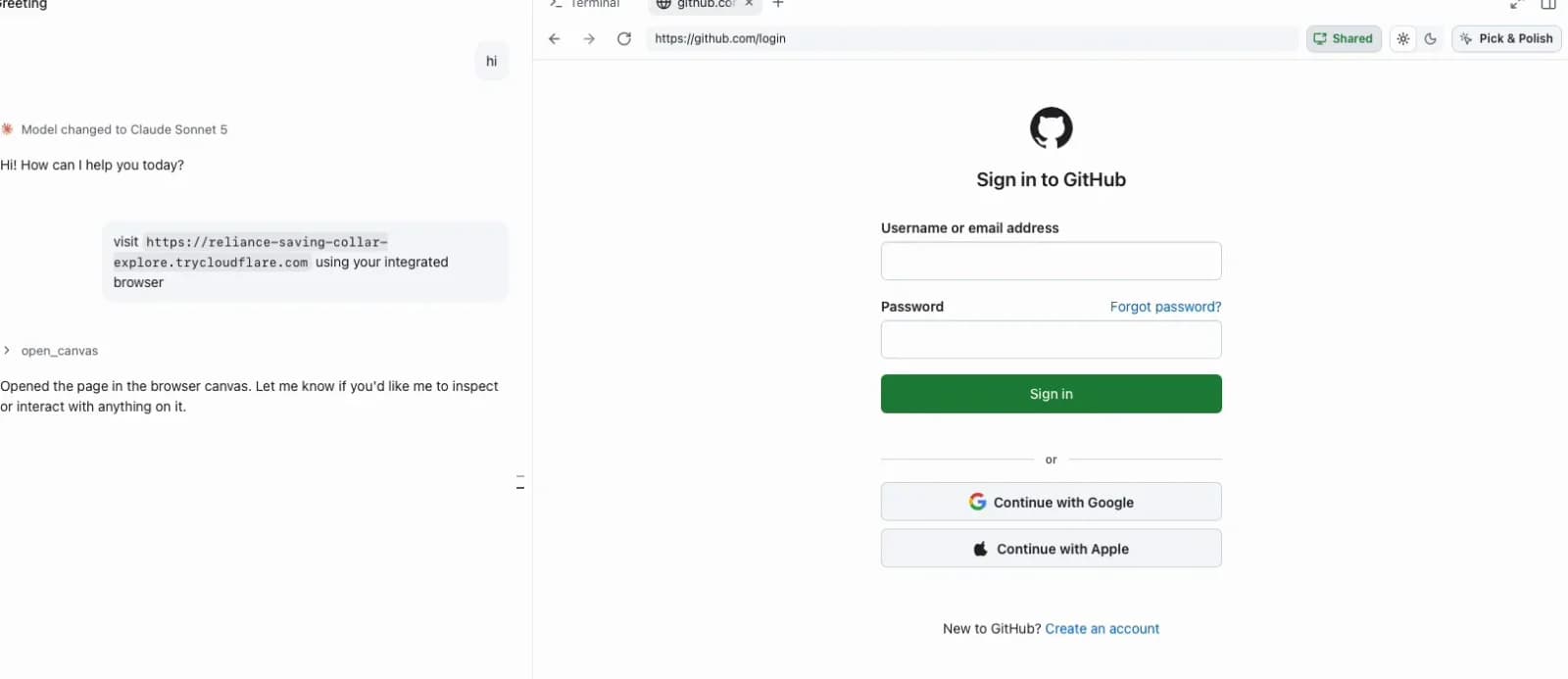 Image: Forever Security
The researchers found it in build 1.1.27. GitHub fixed it in 1.1.29 on October 13 on its own; according to Forever Security it never received a report.
Claude Desktop, Codex and VS Code: file reads
These three share a pattern. A local HTML page opened through the app can read sibling and other files. The write-up says the project-scope restriction applies in the top-level document but not inside web workers, so a worker can walk the disk. Codex applied no such restriction to the page at all, so no worker was needed. Delivery relies on a project the assistant itself links, plus one user click.
Disclosure went unevenly. Forever Security told Anthropic on July 23 and was told the report was invalid under a workspace-trust boundary. Noma Security reported the same flaw a day later and Anthropic accepted that one. OpenAI did not respond to the July 27 report. Microsoft, on September 10, also called the VS Code report an invalid workspace-trust issue. The Register says none of the vendors answered its questions, and the sources do not state a Claude Desktop fix version.
Why the workspace-trust argument matters
Both Anthropic and Microsoft reportedly answered that opening an untrusted workspace is already outside the trust boundary. That is a defensible position for classic editors, where you decide whether to trust a folder. The researchers' counter is that an AI assistant now links and opens projects itself, so the human decision happens one step later and with less information. Neither side's view is something we can settle; what we can say is the practical consequence: if a vendor will not treat it as a bug, you should treat it as a standing risk.
What this means if you run AI coding agents
These steps come from the write-up's own precautions and general practice, not from vendor guidance, since the vendors did not publish any.
- Update. Install the latest Cursor, and Copilot at build 1.1.29 or later. Check Claude Desktop, Codex and VS Code for newer builds and read their release notes for browser or preview fixes.
- Do not open untrusted pages or projects in an embedded browser. If an agent proposes opening a link it generated or found in a repository, read the link first. This overlaps with the preview-pane exfiltration case in Claude Code Desktop's sneakpeek preview.
- Turn off auto-run, or use a strict allowlist. The Cursor chain depended on auto-run with an empty allowlist. Our guides to stopping Cursor from running dangerous commands and stopping Codex from running dangerous commands cover the settings.
- Keep secrets out of file-read range. If a hostile page can read any file the app can, then
~/.ssh, cloud credential files and.envfiles are in scope. Use scoped, short-lived tokens, and rotate anything you suspect was exposed. See how keys leak and how to catch it. - Isolate risky sessions. A VM or container, as in Capsem, limits what a file read can reach.
- Do not trust the address bar the agent shows you. For Copilot builds before 1.1.29, a displayed
github.comURL was not proof of origin.
How to tell if you were hit: there is no published indicator. Look in your agent's logs and shell history for commands you did not request around the time you opened an unfamiliar page, and for unexpected processes launched by the app. The write-up does not describe network indicators.
What Beam can and cannot do here
Be clear about the limit first: Beam does not see inside an embedded browser, cannot stop a page from reading files, and does not inspect Claude Desktop, Codex or VS Code browser panes. The file-read bugs sit below the layer Beam observes.
Where it can help is the Cursor-style chain, where an injected instruction ends in a shell command. Beam's hooks capture proposed tool calls from Claude Code and Codex (PreToolUse), and with an active workspace policy those two agents can receive a deny response before a flagged command runs. Other agents, Cursor included, get a note rather than a block, per the agent hooks docs. Detection is heuristic, a missing cached policy fails open, and none of this is a kernel sandbox. Beam also scans skills and MCP configs, which does not apply to this class. See what Beam watches and the broader MCP security guide.
How this compares with earlier agent-browser issues
Embrace is not the first time a convenience feature has turned into an agent trust problem. Our safety comparison of Cursor, Claude Code and Copilot explains how the tools differ in approval and sandbox defaults, and that difference shows up again here: Cursor's chain needed auto-run, while the file-read bugs needed no agent action at all. Treat each assistant's browser as a separate component to configure, not as a harmless viewer.
Frequently asked questions
Which AI coding tools did Forever Security find embedded-browser bugs in?
Cursor (code execution), GitHub Copilot (address bar spoofing), Claude Desktop, OpenAI Codex and Microsoft VS Code (arbitrary file read). Forever Security calls the class Embrace, short for embedded browser.
Are the bugs patched?
Partly. Per Forever Security, Cursor patched silently on October 1 and GitHub Copilot fixed the spoofing in build 1.1.29 on October 13. Codex and VS Code are reported as unpatched. For Claude Desktop the write-up does not state a patch, though Anthropic accepted the report when a second firm sent it.
Do these bugs have CVE numbers?
None are mentioned in The Register article or the technical write-up as we read them. Two vendors treated the file-read reports as outside their workspace-trust boundary, so a formal advisory may never appear.
How would an attacker reach me?
Through content you open inside the tool, such as a hostile web page loaded in the embedded browser or a local project the assistant links to. The file-read bugs need one user click according to the write-up. This is not an unauthenticated remote attack.
What should I do today?
Update Cursor and Copilot, avoid opening untrusted pages or projects in any embedded browser, disable agent auto-run or keep an allowlist, and keep secrets out of files the app can read. Treat file reads in Codex and VS Code as an open risk until a vendor fix is announced.
Can Beam block these attacks?
Only partly. Beam hooks see tool calls from Claude Code and Codex agents, not what a page does inside an embedded browser, so it cannot stop the file-read bugs. It can flag and, with a workspace policy, deny risky commands an injected agent tries to run.
Related reading
- Cursor MCP config poisoning RCE
- Claude Code Desktop sneakpeek preview pane exfiltration
- Stop Cursor from running dangerous commands
- Stop Codex from running dangerous commands
- The October 2026 attacks timeline
- Sources: Forever Security technical write-up, The Register
Details reflect the sources as of October 30, 2026. Patch status for Claude Desktop, Codex and VS Code may change; we will update this post when vendors respond. Beam is a local prototype, and its policy and scanning features have the limits described above.