
Windows 11 can record whether you launched coding agents such as Claude Code, Codex, Copilot CLI, Cursor, or Antigravity—and, when optional diagnostic data is on, queue that usage for upload to Microsoft. Reverse engineer Xusheng Li documented the chain on November 16, 2026: MissionControlAggregator.dll matches executable names, persists cohort bitsets under C:\ProgramData\Microsoft\Diagnosis\AggregatorStorage\, and emits Segments.SubCohorts TraceLogging events consumed by DiagTrack. Li verified a test codex.exe launch in the upload queue with "isRequired": false optional privacy metadata.
If you chose Windows as the host for local-first agent work, this is a trust-boundary question separate from model providers: the OS telemetry path can leave the machine even when your agent sessions never send prompts to a cloud.
| Question | Short answer |
|---|---|
| Am I affected? | Yes on many US-default installs where optional diagnostics stay enabled and DiagTrack runs, per Li's clean ISO test |
| Is there a fix? | Disable optional diagnostic data or run agents on a host without this pipeline |
| Does data leave my machine? | Optional tier can upload cohort bitsets; required diagnostics are a separate class Li did not claim holds agent names |
| Are prompts uploaded? | Not in Li's trace of Segments.SubCohorts |
| What should I check? | Diagnostics & feedback setting, DiagTrack / AggregatorHost.exe, persisted state under MissionControlAggregator$ |
How Li followed the names in MissionControlAggregator
Li used Binary Ninja on MissionControlAggregator.dll and found explicit comparisons against agent and tool executables—not heuristic guessing from window titles. The post lists:
- Four CLI-agent slots:
copilot.exe,claude.exe,codex.exe,agy.exe, with extensionless equivalents on the WSL route. - Five desktop-agent slots:
github.exe,claude.exe,codex.exe,cursor.exe,antigravity.exe. - Developer-tool categories covering
node.exe,python.exe,dotnet.exe,gcc.exe,clang.exe,gdb.exe,javac.exe,devenv.exe, andcode.exe, some with publisher checks (for example Node.js Foundation fornode.exe).
The feature gate string is CLICodingAgentUsage, feature id 62580080.
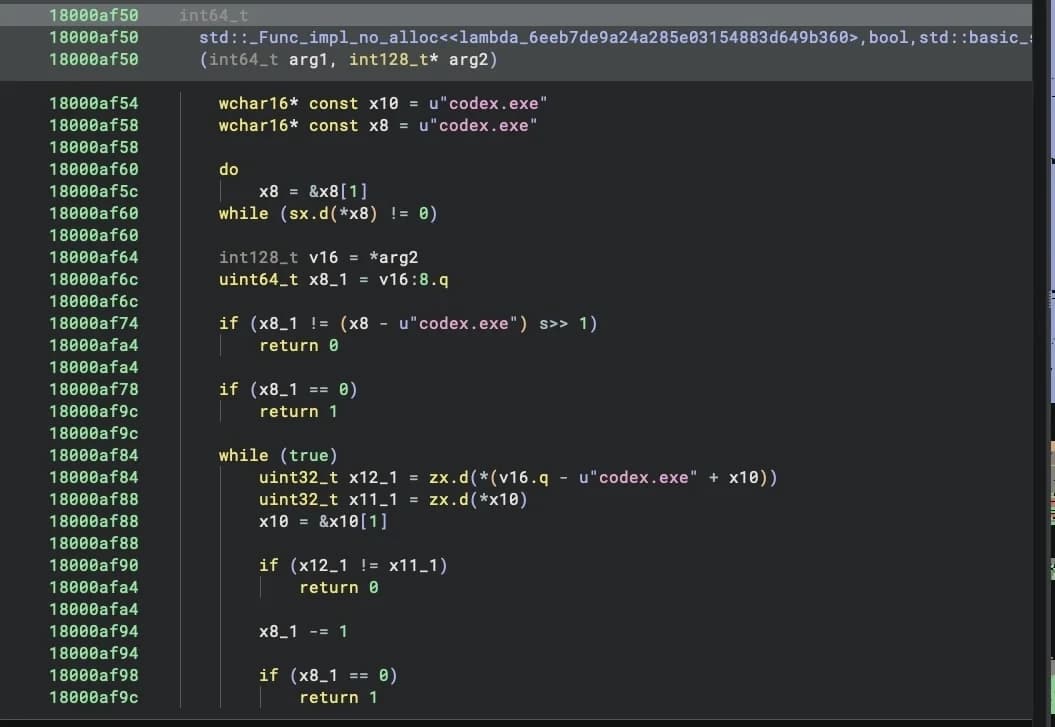 Image: Xusheng Li
Li stresses these are compiler-generated matchers: successful hits set slots in aggregator state, later folded into bitsets by ReportCohorts<12,4,5>—twelve broader tool categories, four CLI agents, and five desktop agents.
Event sources and persistence (step by step)
Li's reconstructed flow, quoted from the primary source:
Aggregator::OnLoadsubscribes to existing ETW providers instead of scanning processes on its own.- Windows programs use
KernelProcess.AppStateChangeSummaryandWin32kTraceLogging.AppInteractivitySummary. - WSL uses
Microsoft.Windows.Lxss.Manager.ExecandExecCriticalwithimageName. - Handlers pass identities into the executable-name matchers; matches set CLI or desktop agent slots.
- On a timer,
ReportCohortsemitsSegments.SubCohortswith bitsets—not repeated executable strings in every event. - State persists under
C:\ProgramData\Microsoft\Diagnosis\AggregatorStorage\MissionControlAggregator$.
Li notes upstream summaries can include runtime, focus time, and resource counters, but this component appears to keep only which categories were observed, not per-agent duration detail in the cohort report.
Li's reproduction with a renamed binary
To prove the matcher is name-driven, Li copied cmd.exe to codex.exe and ran it. The CLI Codex slot set to value 2. After advancing the reporting window and restarting DiagTrack with a trace listener, CliAgentSubCohorts: 4 appeared—1 << 2, the Codex bit. A separate gcc.exe rename set developer-tool slot 3, later visible as SubCohorts: [8] in the optional upload queue.
That matters for defenders: the signal is "this category was seen", not cryptographic attestation that the real Codex shipped from Anthropic.
From ETW to DiagTrack's upload queue
An ETW event alone does not prove exfiltration. Li checked who listens:
Diagtrack-Listenersubscribed to KernelProcess with keywords including the app-state summary bit.- A second subscription targets
Microsoft.Windows.MissionControlAggregatorwith keywords including the report's0x800000000000keyword.
He then inspected DiagTrack's EventStore.db, decompressed JSON batches, and found the agent report classified as optional diagnostic data. With optional data allowed, the event Microsoft.Windows.MissionControlAggregator.Segments.SubCohorts appeared queued with:
"privacy" : { "isRequired" : false },
"CliAgentSubCohorts" : [ 4 ]
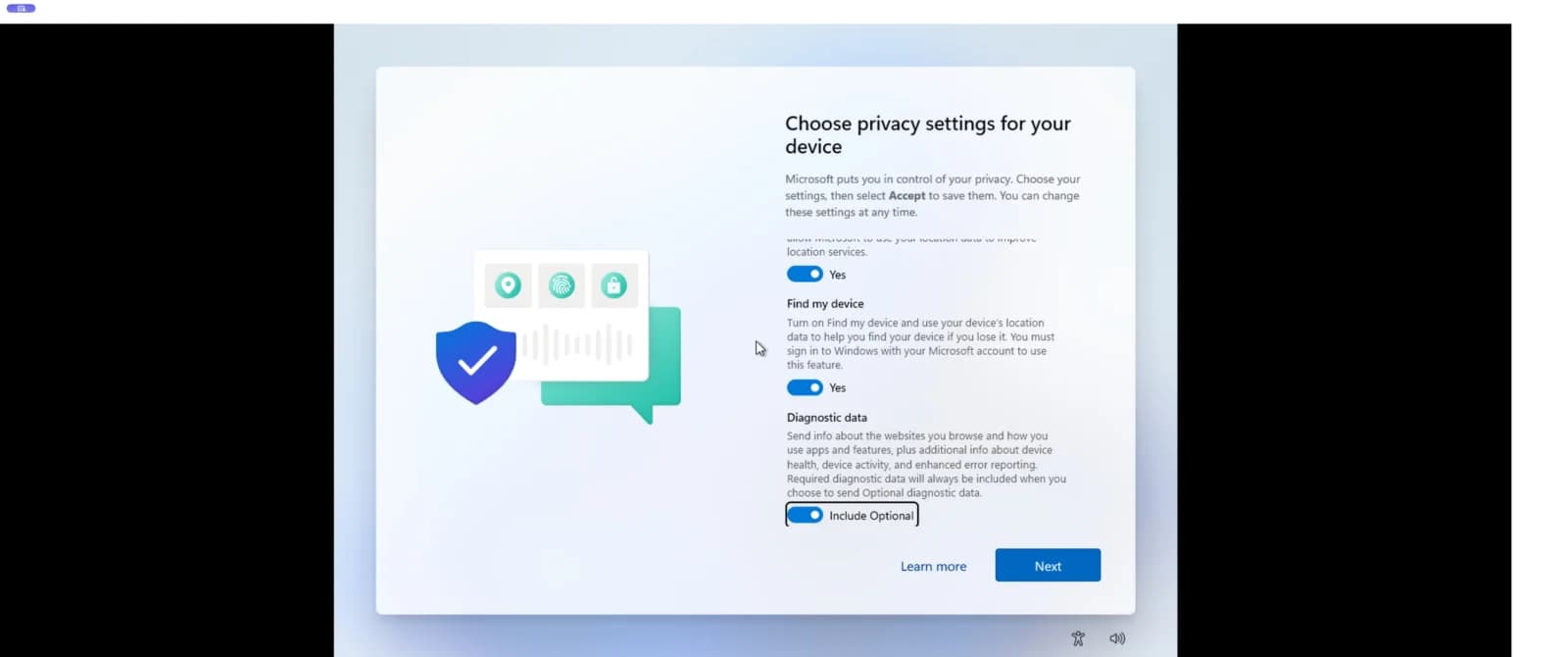 Image: Xusheng Li
Li's US-region clean ISO test had Diagnostic data → Include Optional enabled after setup, with AllowTelemetry = 3. Microsoft's diagnostics and privacy documentation explains the optional tier; Li links the consumer path to Settings → Privacy & security → Diagnostics & feedback → Send optional diagnostic data.
What developers are saying
Discussion on Hacker News item 50524736 mostly frames the finding as consistent with long-standing Windows telemetry skepticism rather than a surprise exploit path. lesspassiveobse argues the cohort only reflects users who keep optional telemetry on, which skews any population-level picture of tool adoption. nelsonfigueroa compares the behavior to treating Windows as spyware-adjacent. None of the top thread comments dispute Li's technical reproduction steps; several pivot to Linux alternatives for development hosts.
What this means if you run AI coding agents
Practical checks grounded in Li's post and Microsoft's diagnostics documentation:
- Confirm the optional diagnostics toggle. If you did not opt out during setup, assume optional upload is on until you verify otherwise.
- Inspect DiagTrack and AggregatorHost. Li's PowerShell snippets show
DiagTrackAutomatic start andAggregatorHost.exeloading the DLL—useful for corp images that claim "no telemetry." - Treat agent binaries as fingerprintable. Renamed copies can set cohort bits; conversely, real agent launches on default installs can too.
- Separate OS telemetry from agent vendor telemetry. Even when you audit Cursor or Fireworks incident telemetry or challenge vendor breach narratives, the host OS may still report which agent family ran.
- Align policy with regulated workspaces. Teams pairing cloud inventory agents with desktop Claude Code should decide whether optional Windows cohorts conflict with customer DPAs—Li's post is evidence for that conversation, not legal advice.
For coding agents with browser or web-fetch tools, OS-level cohorts are orthogonal to site compromise risks; they do not replace checking third-party script integrity on pages agents retrieve.
Optional vs required diagnostic data (Microsoft's tiering)
Li's queue sample is explicit: "privacy" : { "isRequired" : false }. That places the agent cohort report in Microsoft's optional diagnostic bucket—the same class Li tied to the Include Optional toggle during US setup.
Microsoft's organizational diagnostics documentation describes multiple telemetry levels for managed devices. Consumer installs Li tested defaulted toward sending optional data unless the user changed settings. Enterprise admins may restrict telemetry through policy; Li did not exhaust every enterprise GPO combination, so managed laptops may differ from his Home ARM64 VM.
The distinction matters for security architects: required diagnostics can still exist without agent bitsets, while optional is where Li saw CliAgentSubCohorts. Disabling optional data is the consumer lever Li verified; corporates should map the same feature names to their MDM / GPO equivalents rather than assuming "security baseline" images stripped CLICodingAgentUsage.
What is not in the report (per Li's inspection)
Li is careful about negatives. Items he did not find in the traced Segments.SubCohorts path include:
- Prompt text, chat logs, or repository paths.
- Per-invocation dwell time exported in the cohort emission (timestamps describe the collection window, not per-tool minutes).
- Authenticated identity tying the bitset to a named Microsoft account in the JSON snippet he published—though optional diagnostics broadly flow into Microsoft's existing diagnostics pipeline, which Li did not fully reverse beyond the queued event.
What is in scope for defenders:
- Category presence for named agent families and broad developer-tool groupings.
- Persistence on disk under
MissionControlAggregator$, meaning reboots do not necessarily clear historical slot state until the component's save/flush cycle runs. - Proof-by-rename that spoofed binary names can pollute cohort statistics—relevant if malware authors want to blend into "Codex user" cohorts without running real Anthropic builds.
None of that substitutes for compromise detection on the agent host. It is usage telemetry, closer to software inventory than to prompt-injection forensics.
WSL agents vs native Windows CLIs
Li documents parallel routes:
| Route | Source events | Agent names checked |
|---|---|---|
| Native Win32 | KernelProcess.AppStateChangeSummary, interactivity summary | codex.exe, claude.exe, etc. |
| WSL | Microsoft.Windows.Lxss.Manager.Exec | Extensionless equivalents on Linux images |
A team that runs only agents inside WSL Linux distros still shares a Windows host with DiagTrack if WSL integration is enabled. Conversely, Windows-native Claude Code or Codex executables hit the matchers without WSL involvement—Li's codex.exe copy test used the Win32 path.
Containerized or VM-isolated agents on the same metal do not automatically inherit Windows cohort bits unless the Windows shell launches named agent binaries visible to those ETW providers. Teams splitting dev agents in Linux VMs from email-and-browser Windows sessions are making a deliberate partition Li's findings reward revisiting in runbooks.
Security team checklist before the next pilot
- Document the diagnostics toggle on every machine in the pilot. Screenshot or export Settings → Diagnostics & feedback; align with Li's US-default finding or your region's equivalent.
- Baseline
AggregatorHost.exeand module list on golden images; unexpectedMissionControlAggregator.dllversions may change matcher sets between builds 26200.x and later. - Do not confuse vendor opt-outs with OS opt-outs. Disabling Anthropic or OpenAI product telemetry does not, by itself, change Windows optional diagnostics.
- Pair with hook monitoring. If you deploy Beam or similar local watchers (/#watches), OS cohort telemetry is orthogonal evidence—useful in RFP answers, not a substitute for
PreToolUsedeny logs. - Revisit after each Windows feature update. Li found
CLICodingAgentUsageas an experiment on his VM; experiment flags can flip between ISO baselines and cumulative updates without a blog post.
How Beam handles this
Beam is local-first: the collector ingests hook events on your machine for your policy and audit, with no cloud telemetry by default in the product docs at /#local. Beam's agent monitoring cookbooks describe watching PreToolUse and similar hooks—not replacing Windows diagnostics.
Beam does not block MissionControlAggregator, patch DiagTrack, or intercept Microsoft's optional diagnostic queue. Its limits remain hook-based deny where supported, heuristic skill and MCP scanning, and on-device storage with redaction—not a kernel privacy sandbox. If your threat model says "which agent ran" must not leave the workstation, the lever Li verified is disabling optional diagnostics or not using Windows as the agent host, plus whatever your org already does for endpoint DLP.
Frequently asked questions
Is Windows 11 collecting data on Claude Code, Codex, and Cursor?
According to Xusheng Li's November 16, 2026 reverse-engineering post, MissionControlAggregator.dll matches executable names including claude.exe, codex.exe, copilot.exe, cursor.exe, and agy.exe, then reports cohort bitsets through Windows diagnostics when optional diagnostic data is allowed.
Does Windows 11 upload my coding agent prompts or source code?
Li found no prompt text or source code in the Segments.SubCohorts report path he traced. The emitted data is a bitmap of which agent and developer-tool categories were observed during the reporting window.
How do I turn off Windows 11 coding agent telemetry uploads?
Microsoft's diagnostics guide, cited by Li, says you can decline optional diagnostics during setup or disable Send optional diagnostic data under Settings → Privacy & security → Diagnostics & feedback.
Is Windows 11 coding agent tracking enabled on every PC?
No. Li notes the public ISO baseline had the CLICodingAgentUsage experiment disabled by default, while his ARM64 test VM had the feature active before manual changes.
What process loads MissionControlAggregator on Windows 11?
Li shows DiagTrack running AggregatorHost.exe, which loads MissionControlAggregator.dll.
Does this affect WSL-only agent workflows?
Partially. Li documents separate WSL Exec routes, but a normal Windows codex.exe or claude.exe session still hits CLI-agent matchers through KernelProcess.AppStateChangeSummary.
How is this different from Beam agent monitoring?
Beam stores hook events on your machine for your review and policy; it does not phone home to a vendor bucket by default. MissionControlAggregator feeds Microsoft's optional diagnostic pipeline when that tier is enabled.
Did Microsoft announce this coding agent telemetry publicly?
Li's investigation started from undocumented strings in a system DLL, not a product blog. Beam did not find a matching Microsoft announcement describing CLICodingAgentUsage at publication time.
Related reading
- What AI agent monitoring tracks on your machine
- Cursor and Fireworks: agent traces after a provider incident
- Warp vendor breach claims vs what telemetry shows
- Google Gemini managed agents and self-hosted sandboxes
- Wiz AI security agent cloud inventory
Version numbers, Windows builds, and diagnostic behavior are accurate as of November 17, 2026, per Xusheng Li's post and Microsoft's published diagnostics documentation.