
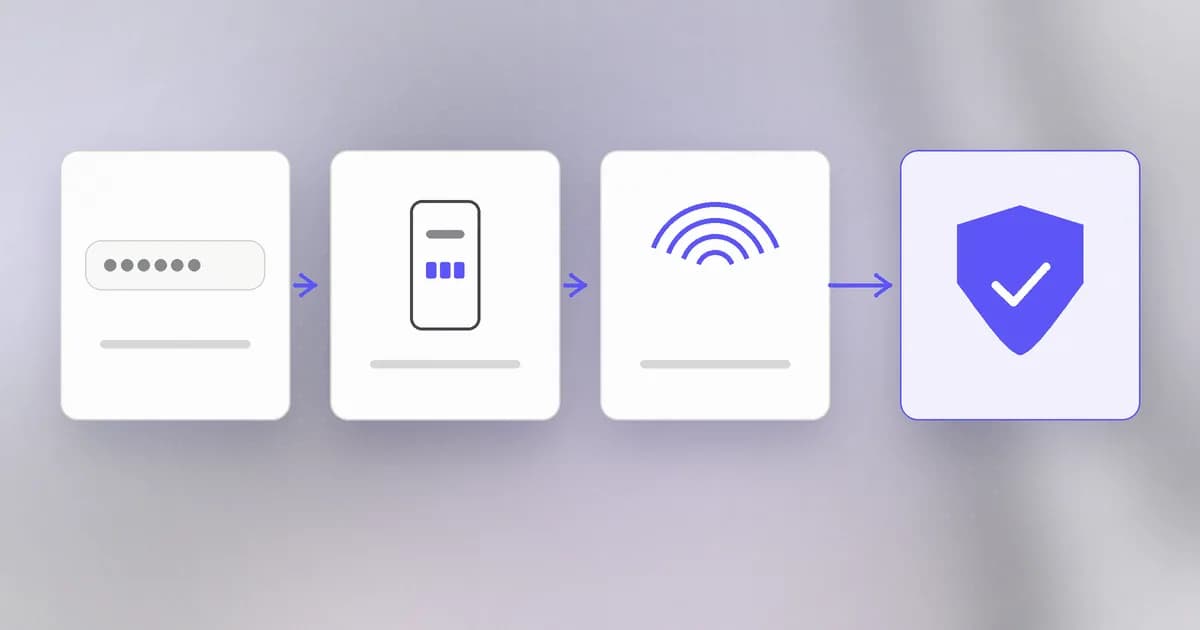
A password is something that can be learned: guessed, leaked, reused or typed into a fake page. Once it is learned, the attacker is you. Multi-factor authentication () adds a second, different kind of proof, so that knowing the password is no longer enough. It is one of the best returns on effort in security, and it is also widely misunderstood, so this lesson is as much about where it breaks as where it works.
Three kinds of factor
A factor is a category of evidence that you are who you claim to be. There are three:
| Factor | Idea | Examples |
|---|---|---|
| Knowledge | Something you know | Password, PIN, answer to a question |
| Possession | Something you have | Phone, hardware key, authenticator app, smart card |
| Inherence | Something you are | Fingerprint, face, voice |
MFA means using factors from different rows. A password plus a security question is not MFA, because both are knowledge: one phishing page collects both. The strength comes from needing to compromise two unrelated things, such as a database that holds your password and a phone in your pocket.
How a six-digit code works (TOTP)
The code in an authenticator app is not magic and not sent to you. It is computed, on your phone and on the server, from two things both sides already share:
- A secret, a random key given to you once, usually as the QR code you scanned when setting up.
- The current time, cut into 30-second steps.
Both sides feed the secret and the step number into a keyed hash (HMAC) and shorten the result to six digits. The scheme is called time-based one-time password () and is described in a public standard, RFC 6238. At login the server computes the code itself and compares; it usually also accepts the step before and after, to allow for clock drift.
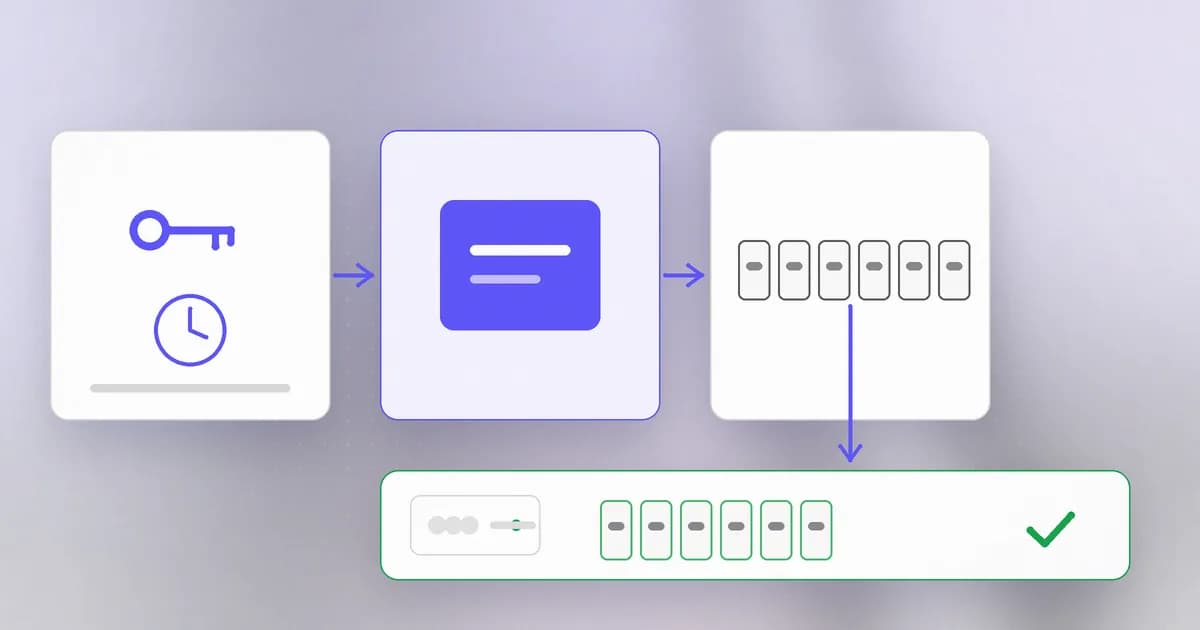
Two consequences follow. First, the code proves you hold the secret without sending the secret. Second, the secret is exactly what a thief wants: whoever copies it, from a screenshot of the QR code, a backup or a leaked database, can generate valid codes forever. TOTP secrets deserve the same care as passwords.
Where each factor fails
No factor is perfect, and attackers choose the weakest one an account allows.
SMS codes. The code travels over the phone network. An attacker who convinces your mobile carrier to move your number to their SIM (a SIM swap) receives your texts. Texts can also be read from a phone with a notification on the lock screen. SMS is still far better than nothing, but it is the first factor to replace when you can.
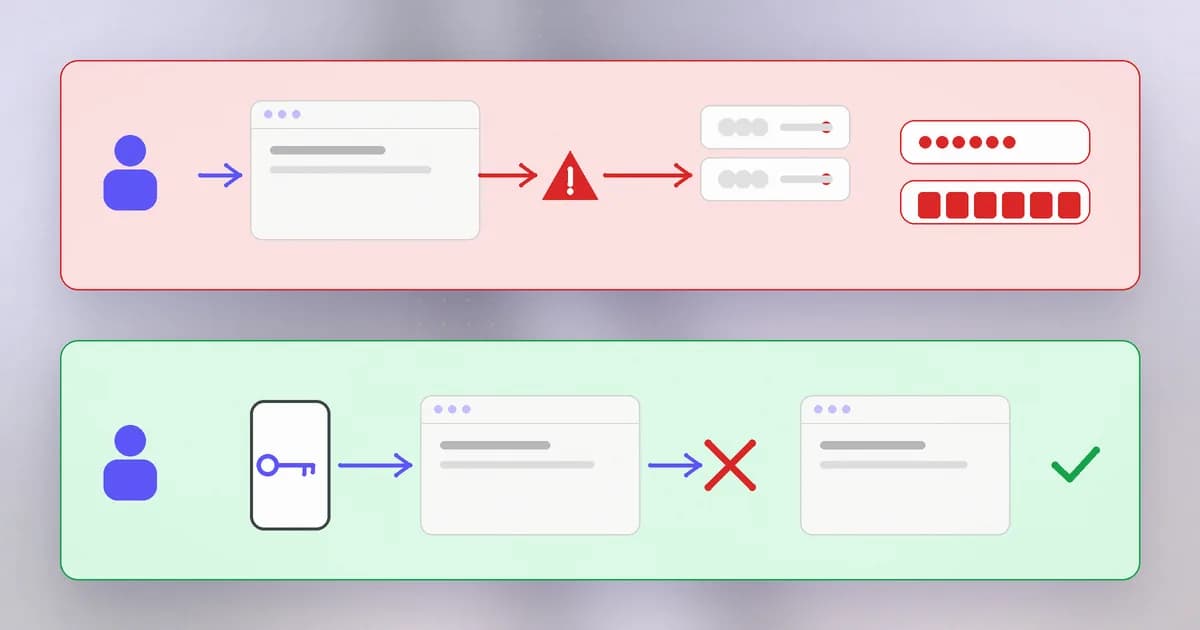
Codes and the real-time relay. An attacker builds a copy of the login page. You type your password and the current six-digit code into it. Their server immediately forwards both to the real site and logs in before the code expires. A code that lasts 30 seconds does not help against someone relaying it in two. This is why phishing beats codes.
Push approvals and MFA fatigue. Some apps send a "Was this you? Approve" notification. If an attacker already has the password, they can trigger the prompt again and again, at night or in a busy moment, hoping you tap Approve to make it stop. This is called or push bombing. Approvals that make you type a number shown on the login screen, or that show where the attempt came from, help a lot.
Recovery paths. Every account has a back door for lost devices: a recovery email, backup codes, a support agent. An attacker who cannot beat the second factor will try to go around it through the weakest recovery path. Protect backup codes like passwords and treat the recovery email as an account that matters equally.
Stolen sessions. After you log in, the site remembers you with a session cookie (next lesson). If malware or a fake page steals that cookie, the attacker is already past the second factor. MFA protects the moment of login, not what comes after.
Passkeys: possession that checks the address
A (built on the FIDO2 and WebAuthn standards) replaces the password. When you create one, your device makes a pair of mathematically linked keys. The public half goes to the site; the private half never leaves your device and is unlocked by your fingerprint, face or PIN. To log in, the site sends a random challenge and your device signs it. The site checks the signature with the public half.
The security property that matters: the signature is bound to the real site address. On a look-alike domain your device finds no matching key and refuses. There is no secret typed or copied, so there is nothing to phish and nothing useful in the site's database. That is why passkeys and hardware security keys are called phishing-resistant, and why they sit at the top of the ranking for important accounts.
Ranked from strongest to weakest:
- Passkey or hardware security key
- Authenticator app (TOTP)
- Push approval with number matching
- SMS code
- Password alone
How AI changes this
Attackers. MFA failures are overwhelmingly social: a believable message makes you approve, type a code, or read it out to a "support agent". Generative AI makes believable messages cheap to produce at scale, in any language, personalised from public information, and AI-generated voices can add a phone call to the script. The defence is a factor that cannot be talked out of you. A passkey does not care how convincing the caller sounds.
Defenders. Pattern detection helps spot an MFA fatigue attempt (many prompts in a row, a login from an impossible location) and can require a stronger check when something looks off. These systems make decisions on probabilities, so keep a strong factor underneath.
Agents. An AI agent cannot hold your fingerprint, and it should not hold your TOTP secret or backup codes. Agents that need to act in your accounts should be given their own credentials with narrow scope (covered in the final lesson of this level), not the ability to approve prompts on your behalf. Be especially careful about handing an agent a screenshot or export that contains a QR code or recovery codes. The old problem is unchanged: a factor is only as good as the care taken over what generates it.
Try it
This lab computes a code on your own machine from a secret you invent. It does not touch any real account. You need Python 3.
import base64, hashlib, hmac, struct, time

def totp(secret_b32, at=None, step=30, digits=6):
    key = base64.b32decode(secret_b32)
    counter = int((at or time.time()) // step)
    mac = hmac.new(key, struct.pack(">Q", counter), hashlib.sha1).digest()
    offset = mac[-1] & 0x0F
    value = struct.unpack(">I", mac[offset:offset + 4])[0] & 0x7FFFFFFF
    return str(value % 10**digits).zfill(digits)

secret = "JBSWY3DPEHPK3PXP"   # made up, for this lab only
now = time.time()
print("now:      ", totp(secret, now))
print("in 30 sec:", totp(secret, now + 30))
print("wrong key:", totp("MFRGGZDFMZTWQ2LK", now))
Run it twice a few seconds apart; inside the same 30-second window the code is identical, and the next window gives a different one. Anyone with the same secret and a clock gets the same number, which is exactly why the secret must stay private. Now open the security settings of one real account you own and check which second factors it offers; enable the strongest one.
Check yourself
Why does a password plus a security question not count as multi-factor?
Both are knowledge factors. One phishing page, or one breach, can collect both at once. MFA needs factors of different types.
An attacker has your password and your authenticator code expires in 30 seconds. How can a fake login page still beat it?
By relaying in real time: the fake page passes your password and code to the real site immediately and logs in within the 30 seconds. Short-lived codes do not stop a relay. A passkey does, because it only signs for the true site address.
You get ten approval prompts at 3 a.m. that you did not trigger. What is happening and what do you do?
Someone has your password and is trying MFA fatigue. Do not approve any of them. Change the password, review recent sign-ins, and switch to a method with number matching or a passkey.
Does MFA protect an account after you have logged in?
Not by itself. After login the site relies on a session cookie or token. If that is stolen, the attacker skips the login step entirely, which is the subject of the next lesson.
Next
You proved who you are once. Next: how the site remembers that without asking again, with sessions, cookies and tokens.