
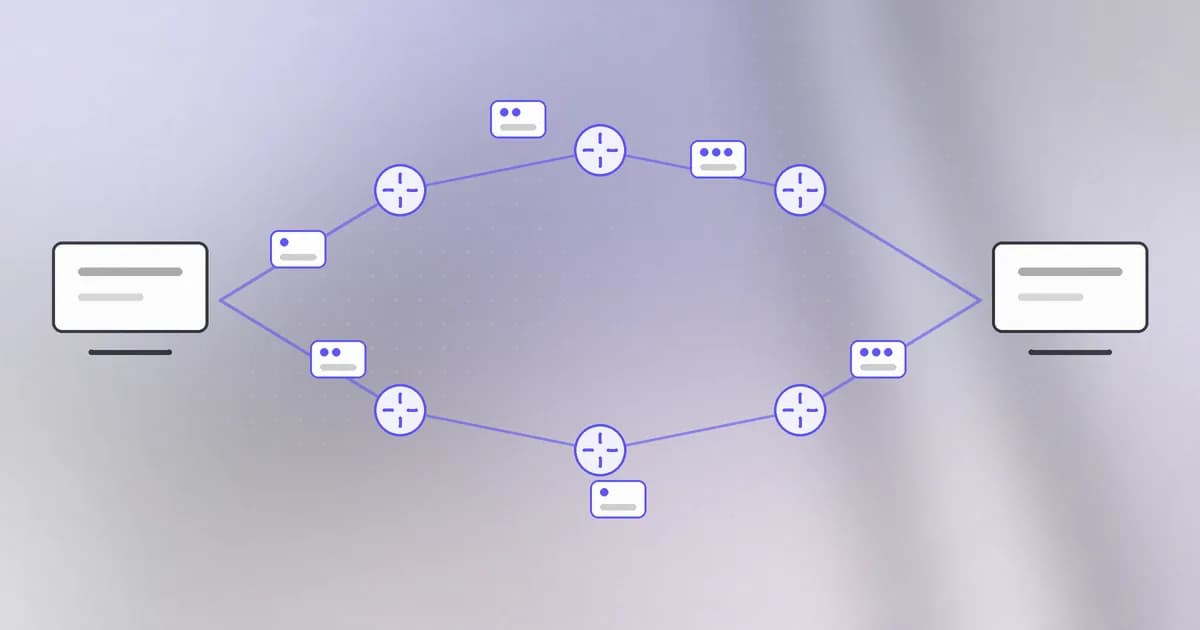
Everything online, from loading a page to an agent calling a tool, is one program on one machine sending bytes to a program on another. Three ideas explain how those bytes find their way: the IP address, the port, and the packet. Learn them and every later network topic has a place to land.
IP addresses: which machine
An identifies a device on a network, so data knows where to go. The common form (IPv4) is four numbers from 0 to 255, such as 192.0.2.10. A newer form (IPv6) is longer, like 2001:db8::10, because the world ran short of the short ones.
Two kinds matter:
- Public addresses are reachable from the internet. Your home router has one, handed out by your internet provider.
- Private addresses are for use inside a network, such as
192.168.x.xor10.x.x.x. Your laptop has one from your router. Outside your home, nobody can send to it directly.
One address is special. , 127.0.0.1, always means "this machine". A message to it never leaves your computer.
Ports: which program
A machine runs many network programs at once: a web server, a database, a mail program. The IP address finds the machine, but which program gets the data? That is the job of the , a number from 0 to 65535. A program that wants to receive connections listens on a port.
Some ports are conventions:
| Port | Usually |
|---|---|
| 22 | SSH, remote login |
| 80 | Web traffic, unencrypted |
| 443 | Web traffic, encrypted (HTTPS) |
| 5432 | PostgreSQL database |
The pair of address and port, written 192.0.2.10:443, names exactly one program on one machine.
Packets: how the data travels
You do not send a whole file in one go. Your computer cuts a message into small chunks called . Each packet carries a label: where it came from, where it is going (address and port), and a number saying which piece it is. Routers, the machines in between, read that label and pass the packet one step closer, one hop at a time. Different packets of the same message may take different routes.
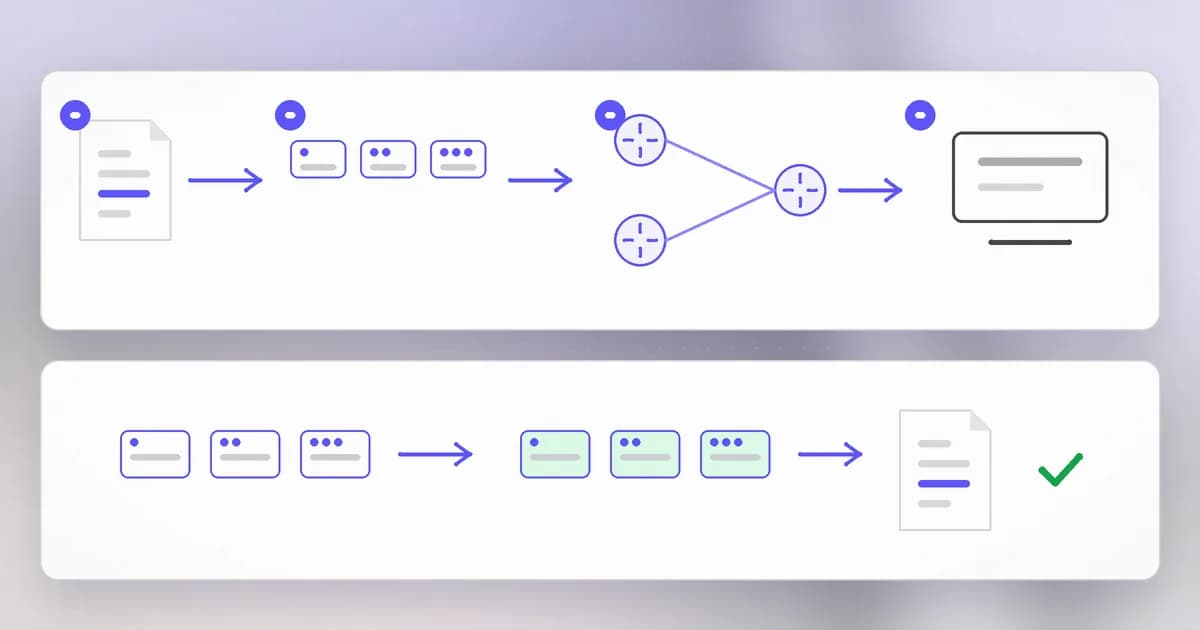
At the destination, the pieces are put back in order. The rules for doing this reliably are a connection: the two sides first agree to talk (a short exchange called a handshake), number the pieces, and resend any that go missing. That is why a page arrives complete even over a bad connection. Some traffic, such as video calls, uses a faster, looser cousin called UDP that does not resend lost pieces.
Two consequences matter for security.
- Anything in a packet can be read by the machines that carry it, unless it is encrypted. Encryption comes in lesson nine.
- The label is not proof. A packet says where it came from, but that field can be faked. We return to this in the level on networks.
Doors and walls
Every listening port is a door. If a service listens on all of a machine's addresses, anyone who can route to it can knock. If it listens only on 127.0.0.1, only programs on that machine can. This is why so much advice boils down to: expose as few ports as you can. The collection of doors is your .
A is a wall with rules about which doors are allowed. It looks at the address and port on each packet and allows or drops it. A common setup blocks every incoming port except the few you need.
A real case: shrinking the doors
Beam's guide on locking down a VPS with Tailscale and Cloudflare Tunnel is the idea in practice. Tailscale builds a private network where each device gets a private 100.x.y.z address, so you can reach SSH over that private address while the firewall blocks everything public. The guide also makes a careful point: a tunnel removes your server from direct internet access, but it is not a patch. If the software behind the door is vulnerable, closing the door in front of it reduces who can reach it, not what is wrong with it.
How AI changes this
Scanning gets cheaper and faster. Finding open doors was already automated. Wiz's analysis of an AI-driven cloud intrusion, in Beam's summary, lists traits such as hundreds to thousands of actions per hour and simultaneous activity across platforms. Machine speed means an exposed port or a forgotten admin panel is noticed sooner. The fix is the same as before and now more urgent: close what you do not need, and put the rest behind a private network or a login.
Agents are network clients. A coding agent can run curl, install packages and call tools, so it can send data out. If it reads a hostile instruction, it could be steered to send a file somewhere. Limiting where a machine may connect out to is called . Everything in this lesson, address, port, allowed or blocked, is how that control works.
What is not new: packets, ports and routing are exactly the same. AI changes who and what is knocking on the doors, not how doors work.
Try it
This lab runs entirely on your own machine and talks only to itself.
- Find your addresses:
ifconfig | grep "inet "on macOS, orip addron Linux. Note the private one (probably192.168.x.xor10.x.x.x) and127.0.0.1. - In one terminal, start a tiny web server that listens only on localhost:
python3 -m http.server 8000 --bind 127.0.0.1. - In a second terminal, list listeners:
lsof -iTCP -sTCP:LISTEN -n -P | grep 8000. Find the address column: it reads127.0.0.1:8000. - In the second terminal, visit it:
curl -s http://127.0.0.1:8000 | head. You will see a directory listing. - Stop the server with Ctrl+C in the first terminal, and repeat step 4. The connection is refused, because nothing is listening on that door any more.
Check yourself
What does an IP address identify, and what does a port identify?
The IP address identifies a machine on a network. The port identifies one program on it, so address plus port names exactly one listening service.
Why is a service bound to 127.0.0.1 safer than one bound to all addresses?
127.0.0.1 means this machine only. Other computers cannot route to it, so only programs on the same machine can connect. A service on all addresses is a door anyone who can reach the machine may try.
A large file is sent across the internet. What happens to it on the way?
It is cut into packets, each labelled with source, destination and sequence number. Routers pass them along hop by hop, possibly by different paths, and the receiver puts them back in order, asking for resends if some are missing.
A firewall allows only port 443 inbound. Does that mean the server behind it is secure?
No. It means fewer doors are open. The program behind port 443 can still have flaws, so the firewall reduces who can reach a bug but does not fix it.
Next
Machines are found by number, but people use names. Next: how a name like agentbeam.com becomes an address.