
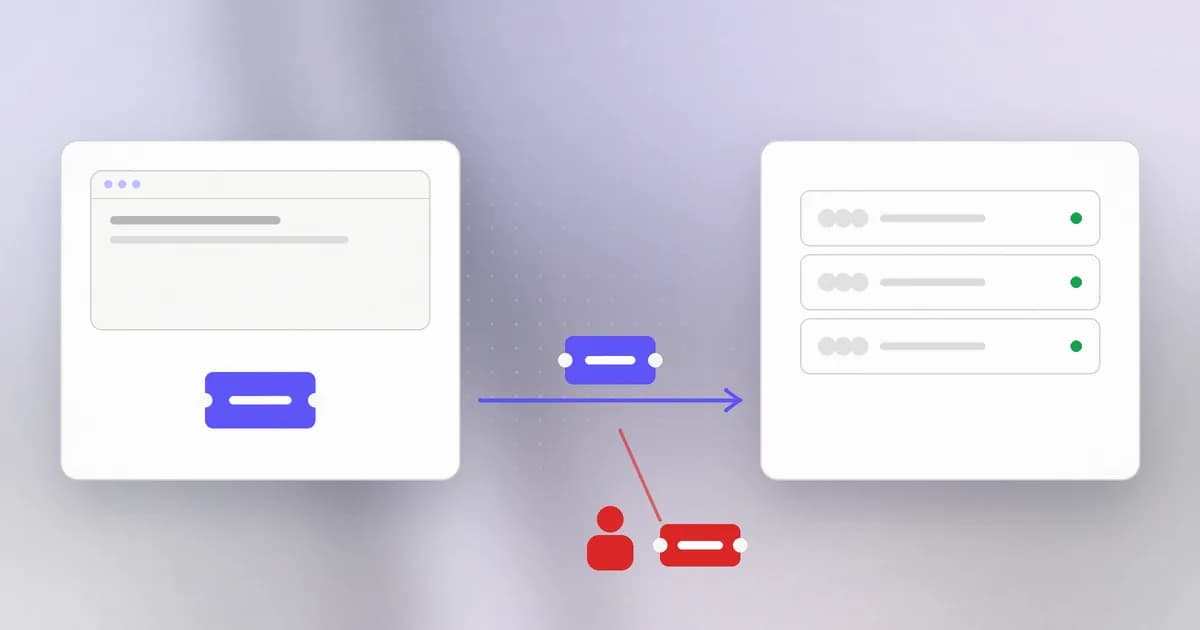
In the HTTP lesson you saw that every request is independent: the server answers one and forgets it. Yet when you log in to a site, you stay logged in across a hundred clicks. Something must carry your identity from request to request. That something is the subject of this lesson, and it is one of the most valuable things on the internet to steal, because it is the proof that login already happened.
The ticket idea
Think of a cloakroom. You hand over your coat once, receive a numbered ticket, and from then on only the ticket matters. Nobody asks for your name again; whoever holds the ticket gets the coat.
Web login works the same way:
- You send your username, password and second factor once.
- The server checks them and creates a session: a record on the server saying "user 4821 is logged in, started at 09:12".
- The server gives your browser a session ID, a long random value that points at that record.
- Your browser sends the session ID on every later request. The server looks it up and knows who you are.
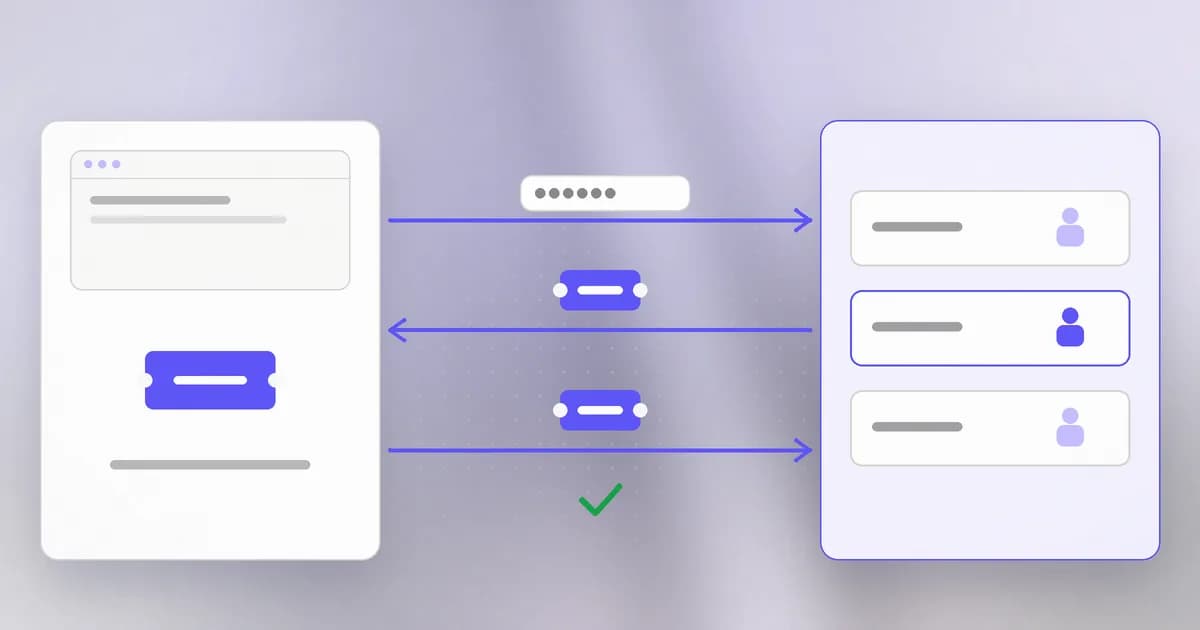
The session ID has two requirements. It must be unguessable, meaning generated by a cryptographically secure random generator and long enough (128 bits or more) that nobody can find a valid one by trying. And it must be secret, because possession is the whole proof.
Cookies carry the ticket
A cookie is a small piece of text the server asks the browser to store and send back automatically to the same site. The server sets it in a response header:
Set-Cookie: session=k3J9x...long-random...Qp; Secure; HttpOnly; SameSite=Lax; Path=/; Max-Age=3600
This one carries a . Each attribute after the value is a safety setting:
| Attribute | What it does |
|---|---|
Secure | The browser only sends the cookie over HTTPS, never in plain text |
HttpOnly | JavaScript on the page cannot read the cookie, which limits theft through a script injected into the page |
SameSite | Controls whether the cookie is sent on requests started by other sites (Lax or Strict reduce cross-site request forgery) |
Max-Age / Expires | How long the cookie lives. Shorter limits the window for misuse |
Path / Domain | Which part of the site receives it |
A session cookie without Secure and HttpOnly is a common finding in security reviews. These flags do not make the cookie unstealable; they close specific doors.
Tokens: the ticket that carries its own details
A session ID is an opaque pointer, and the details live on the server. The alternative is a token that carries the details itself, signed so the server can trust it without a lookup. The best-known format is the JSON Web Token (). It has three parts separated by dots:
header.payload.signature
- The header names the signing method.
- The payload holds claims, for example who the user is and when the token expires.
- The signature is a keyed hash of the first two parts, made with a key only the server knows.
Header and payload are just encoded (base64url), not encrypted. Anyone holding the token can read them, so never put secrets there. What the signature gives is integrity: if someone changes a claim, say from "role":"user" to "role":"admin", the signature no longer matches and the server rejects it.
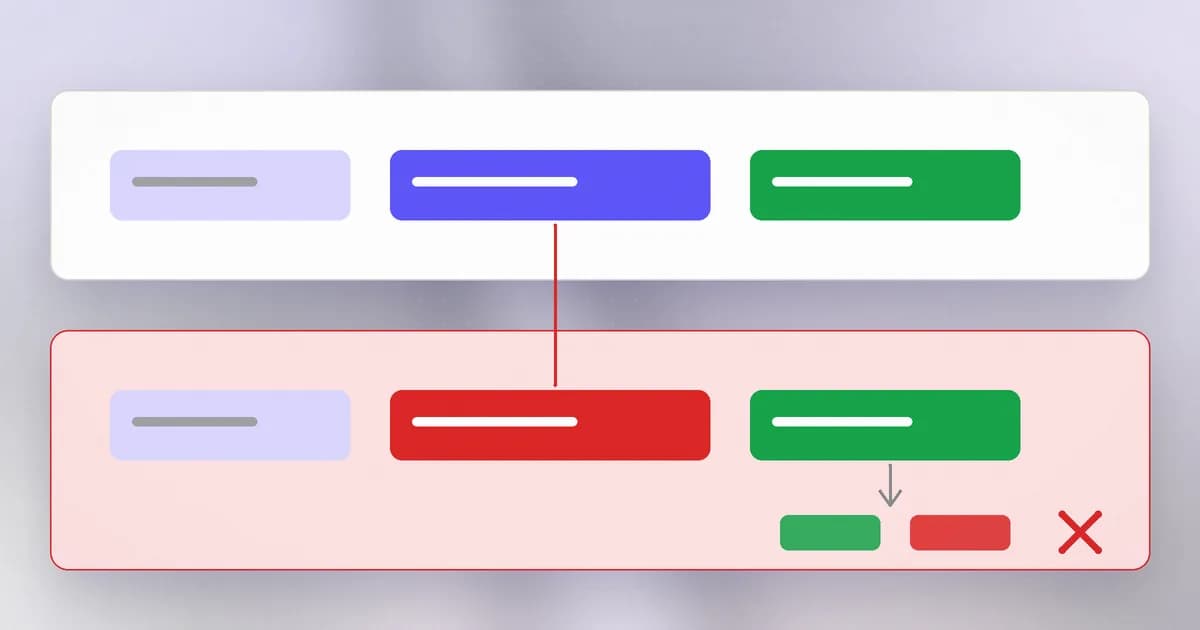
Signed tokens are convenient because any server with the key can check one with no database lookup. The cost is that you cannot easily cancel one. A session record can be deleted from the server instantly; a token already issued stays valid until it expires unless you keep a deny-list, which brings back the lookup. The usual answer is a short expiry (minutes) paired with a longer-lived refresh token kept more carefully.
A token sent in an Authorization: Bearer ... header is called a : whoever bears it is treated as the owner, no further proof asked. API keys and the tokens used by apps and agents mostly work this way.
What a server must check
Accepting a signed token takes more than seeing one. A careful server verifies the signature with the expected algorithm, checks it has not expired, checks it was issued for this service, and then still decides what this user may do. A token that only proves who you are does not say what you may do; confusing the two is a theme of the last lessons of this level.
When a ticket is stolen
Because the ticket is the proof, whoever copies it becomes you, without needing your password or second factor. Common routes:
- Malware on your computer reading the browser's stored cookies. This is a main way attackers get around MFA today.
- A malicious script on a page reading a cookie that lacks
HttpOnly. - A logged token. A server or proxy that writes request headers to a log has written working tickets into a file that many people can read.
- A look-alike login page that relays your login and keeps the resulting session.
- Tokens pasted somewhere: a screenshot, a support ticket, a chat.
Defences follow from the routes: short lifetimes; sign out on shared devices; revoke all sessions after a suspected compromise; ask for a fresh login before sensitive actions like changing the email or a payment; keep tokens out of logs and URLs; and, where supported, bind a token to the device that received it.
How AI changes this
Attackers. The scale and quality of the lures that lead to stolen sessions increases with AI, as with all phishing. Automated scanning also finds exposed tokens faster: a bearer token committed to a public repository or posted in a log can be found and tried by a program within a short time. Speed shifts toward the attacker, so the defence leans on short lifetimes.
Defenders. Detecting that a session suddenly moved country, changed device fingerprint, or began doing things its owner never does is a good fit for automated analysis. Systems that watch for tokens in logs can alert before someone else finds them.
Agents. Browser-driving agents operate inside your logged-in session, so they hold the ticket and can do whatever the session allows, including things you did not intend if a web page tells them to (that is ). Agents that call APIs hold bearer tokens, and a token an agent can read is a token its logs, its tool output and anything it is tricked into repeating can expose. A researcher's October 2026 disclosure described a Claude session-bridge token that allegedly skipped plan limits; Anthropic disputed part of the report, and the post is careful to separate claims from verified facts: read it here. The lesson to take is the general one: tokens must be scoped, short-lived and checked for what they permit, not just for being valid.
Try it
This lab runs a tiny server on your own machine (127.0.0.1 is "this computer only") and builds a token with the Python standard library. Nothing leaves your machine.
Step 1: see a cookie being set. Save this as cookie_server.py in a scratch folder and run python3 cookie_server.py.
from http.server import BaseHTTPRequestHandler, HTTPServer
import secrets

class H(BaseHTTPRequestHandler):
    def do_GET(self):
        self.send_response(200)
        self.send_header("Set-Cookie", f"session={secrets.token_urlsafe(24)}; HttpOnly; SameSite=Lax; Path=/; Max-Age=60")
        self.end_headers()
        self.wfile.write(b"hello\n")

HTTPServer(("127.0.0.1", 8099), H).serve_forever()
In a second terminal run curl -i http://127.0.0.1:8099/. Find the Set-Cookie line. Run it again and notice the value differs: each ticket is random. We left out Secure only because this lab uses plain local HTTP; a real site must set it. Stop the server with Ctrl+C.
Step 2: build and tamper with a signed token.
import base64, hashlib, hmac, json

def b64(b): return base64.urlsafe_b64encode(b).rstrip(b"=").decode()
def sign(data, key): return b64(hmac.new(key, data.encode(), hashlib.sha256).digest())

key = b"lab-only-secret"
head = b64(json.dumps({"alg": "HS256"}).encode())
body = b64(json.dumps({"user": "sam", "role": "user"}).encode())
token = f"{head}.{body}.{sign(head + '.' + body, key)}"
print(token)

# An attacker edits the payload but cannot re-sign it
forged_body = b64(json.dumps({"user": "sam", "role": "admin"}).encode())
forged = f"{head}.{forged_body}.{token.split('.')[2]}"
ok = hmac.compare_digest(forged.split(".")[2], sign(head + "." + forged_body, key))
print("forged token accepted?", ok)
Paste the payload part of your token into a base64 decoder, or decode it in Python, and confirm you can read it. That is why secrets do not belong in it.
Check yourself
Why must a session ID be generated by a secure random generator rather than a counter?
If IDs are guessable, an attacker can try neighbouring values and take over other people's sessions without stealing anything. A long random value makes finding a valid one impractical.
What does the HttpOnly flag protect against, and what does it not?
It stops page scripts from reading the cookie, so a script injected into the page cannot simply copy it. It does not help against malware on your device, a relayed login page, or a token written to a log.
A JWT payload says role is admin. Can you trust that on sight?
Only after the server has verified the signature with the right key and algorithm and checked the expiry. The payload is readable by anyone, so an unverified claim is just text.
Why do many systems use a 10-minute token plus a refresh token instead of one token valid for a year?
A stolen long-lived token works for the whole year and is hard to cancel. A short token limits the damage window, while the refresh token, held more carefully, lets the user stay logged in.
Next
Sessions only help if the login check itself holds. Next: broken authentication, where the check can be skipped, with a real exploited case.